
In a BIM workflow, modeling can easily become very time-consuming—which is why the level of modeling detail should be chosen with care and purpose, especially in the early planning phases. In interdisciplinary collaboration, disciplines such as building services engineering rely on architectural model data early on, even though these models often lack the necessary precision in the early phases (and are frequently still subject to change). Added to this are the potential challenges associated with data transfer, which can be particularly difficult in an Open BIM scenario when different software programs are used.
This article highlights several ways to use a few simple tricks to reduce the effort involved in BIM-supported collaboration—especially in the early planning phases—to the absolute minimum.
Keywords: Conceptual, Modeling, Placeholder, Open BIM, Installation Zone, Zone, Installation, Dummy, Object, Development, Degree, Box
Especially in interdisciplinary collaboration, many spatial coordination decisions must be made early on—for example, regarding installation zones such as shafts or conduit routing in ceilings or floors. Typically, architectural models are handed over to the MEP design team at an early stage for this purpose.
This often leads to technical issues during the handoff of models—especially in an Open BIM workflow involving different software across various disciplines.
A very simple solution to this problem: Instead of handing over the entire architectural model to the MEP design team at a very early stage, only the installation zones need to be provided. While these must be modeled by the architectural team, they significantly simplify the data transfer process. The diagram illustrates this schematically:
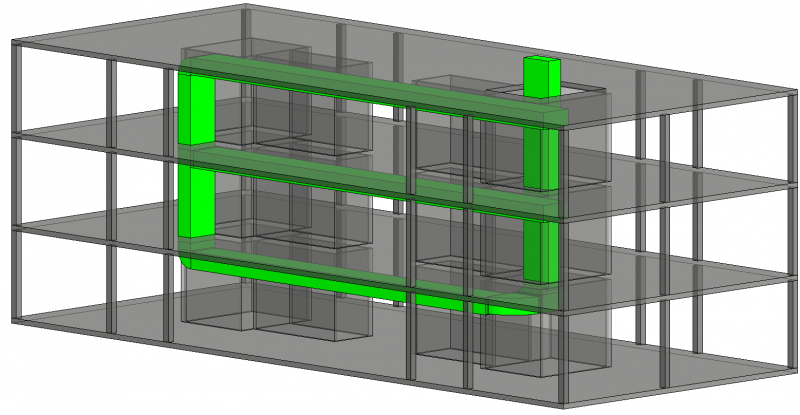
The green objects represent planned installation zones; these are modeled in the architectural model.
Instead of exporting the entire building (shown schematically here as the gray elements) to an IFC file, only the green placeholders for the installation zones are exported.
This reduces the amount of data and saves some effort during export and import—while still providing a solid foundation for early modeling of the main routes in the MEP system. Architects have an additional visual check when they modify building components that affect the reserved zones—collision checks further enhance this ability to monitor and coordinate.
It is not uncommon for BIM users to have an astonishing attention to detail when modeling. As described in greater depth in the article “Phase-Appropriate Modeling,” a high level of detail can lead to time-consuming changes, especially in early planning phases, and also suggests a level of model development that often does not yet exist.
It is therefore advisable to work with so-called "dummy objects" in the early stages—that is, simplified geometric placeholders positioned in place of the final object. Here are a few examples of objects for which this approach has proven to be very useful:
- Windows and doors—in the early stages, simple openings are sufficient
- Stairs—simplified objects (such as sloped surfaces or simple boxes representing the entire stairwell) save the time-consuming task of modeling stair objects in the early stages
- Wall and ceiling packages without layered structures, with their approximate thicknesses
- Building services and electrical engineering elements, such as boilers.
Note
Many modeling guides repeatedly offer tips on how to handle specific objects in the early stages to save time and effort!