
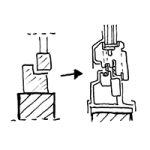
Determining a practical level of geometric detail for digital building models and their components is a complex task and depends largely on the specific application scenario and discipline-specific objectives. For example, steel construction firms require a significantly higher level of detail in models than structural engineers or architects. High levels of detail, in turn, can lead to significant performance issues, particularly in large projects...
Search terms: detail, detailing, depth, degree, 2D, Det, Dtai, detail element, sketch, sheet, plan
The level of geometric detail in digital building models is referred to internationally as the "Level of Geometry"—for more information, see this article. Two key indicators determine the level of geometric detail:
- What objects are actually included in a model?
- How detailed are they?
As described in the article on LOD, the fundamental problem is that the computers typically used in construction planning cannot handle infinitely high levels of detail, because all systems and software platforms (especially in large-scale projects) quickly reach their performance limits in this regard.
The key, then, is to find the right level of geometric detail for the specific application—and this article aims to provide some guidance and food for thought on this task.
The first key question in determining the level of detail in a model is which objects should be included in the model—and which should not. To get you thinking, here are a few examples of "classic" scenarios involving this question:
- Baseboards—do I need to model them, or can I calculate them based on the room perimeters minus the widths of doors and windows?
- Floor stands, suspended ceiling hangers, underfloor heating coils, and similar items—while they can certainly be relevant for collision detection—create an enormous geometry load
- Faucets on sinks and vanity units, door handles, and window handles—is modeling necessary, or is a type description sufficient?
- Mounting brackets and installation elements for building services components—designers say no, contractors say yes.
These few examples illustrate a dilemma—because there is no right or wrong answer here. In fact, these decisions can (and must) be made on a case-by-case basis for each project—at least until a binding standard on this topic is established.
Many newcomers to BIM approach BIM software with sky-high expectations regarding its capabilities for two- and three-dimensional visualization—and are often bitterly disappointed. Unfortunately, especially in larger projects, all software platforms suffer significant performance losses when it comes to rendering tens of thousands of highly detailed individual objects. Added to this are the vastly different approaches in individual BIM programs to handling the 2D and 3D level of detail for objects.
The dream of being able to derive two-dimensional 1:1 details from objects such as windows or doors, create high-end visualizations of interiors, or send CAM-ready data to milling or welding robots may be achievable in isolated cases and very small construction projects —but in larger projects, at the very latest, the use of such objects creates a geometry load that no software is capable of rendering smoothly.
For this reason, special attention must be paid to the level of geometric detail of BIM objects. Given the current state of the art, the following rules can be derived from practical experience, at least for the phases up to and including construction design:
- LoG down, LOI up—objects should be depicted with as little detail as possible—but should be provided with the necessary information - An example would be a geometric dummy of an office chair in the shape of a cube—the exact manufacturer’s product number, for instance, can be assigned to it as information, thereby uniquely identifying it as that product and making it suitable for tendering—without having to render it in all its glory in three dimensions
- Although 2D detail planning is generated based on stored model sections, it is fundamentally carried out in 2D—the window profile shown above will not appear in real BIM models anytime soon. For more on this, read the article on detail planning in BIM
- Fasteners such as screws, brackets, and the like are not depicted
- As a general rule: The goal is to achieve a level of detail in models that still allows all model components to be clearly identified in a 1:50 plan view. Absolute maximum: 1:20.
As with any rule, there are certainly exceptions depending on the specific application—a steel or wood construction company, for example, may well be interested in the representation of fasteners, and plumbers may also have higher requirements in some cases—and fabrication and installation planning undoubtedly requires a higher level of detail.
Nevertheless, these principles can be relied upon to successfully implement even large-scale projects using BIM, at least up to the construction drawing phase.