pyRevit is an open-source extension for Autodesk Revit that allows users to customize and extend Revit using Python and Dynamo scripts. The framework is primarily aimed at BIM managers, developers, and advanced Revit users who want to automate their workflows and streamline repetitive tasks.
Keywords: Automation, Tool, Python, Dynamo, Toolbar
Disciplines: Architecture, Structural Engineering, Building Services Engineering, Electrical Engineering
Manufacturer: open source
Manufacturer's website: pyrevitlabs.notion.site
- Python-based scripting: Users can write their own scripts in Python to access the Revit API and automate functions.
- Custom toolbars: With pyRevit, you can create custom panels and buttons in the Revit interface.
- Live reloading: Changes to scripts are detected in real time and applied without restarting Revit.
- Quick access to the Revit API: Through a pre-configured Python environment with access to RevitServices, RevitAPI, and RevitNodes.
- Shell and CLI Tools: pyRevit offers command-line tools for managing scripts, deployments, and user configurations.
- Developer-friendly structure: Clearly defined folder structures and templates simplify development.

- Automated creation and export of drawings
- Batch processing of parameters in components
- Analysis and validation of model information
- Custom IFC, BCF, or Excel interfaces
- Integration with BIM standards and user-defined workflows
Some developers make their own toolbars available as open source. Once installed, a tab with many tools appears:

The underlying tools are available for review and can be further developed.
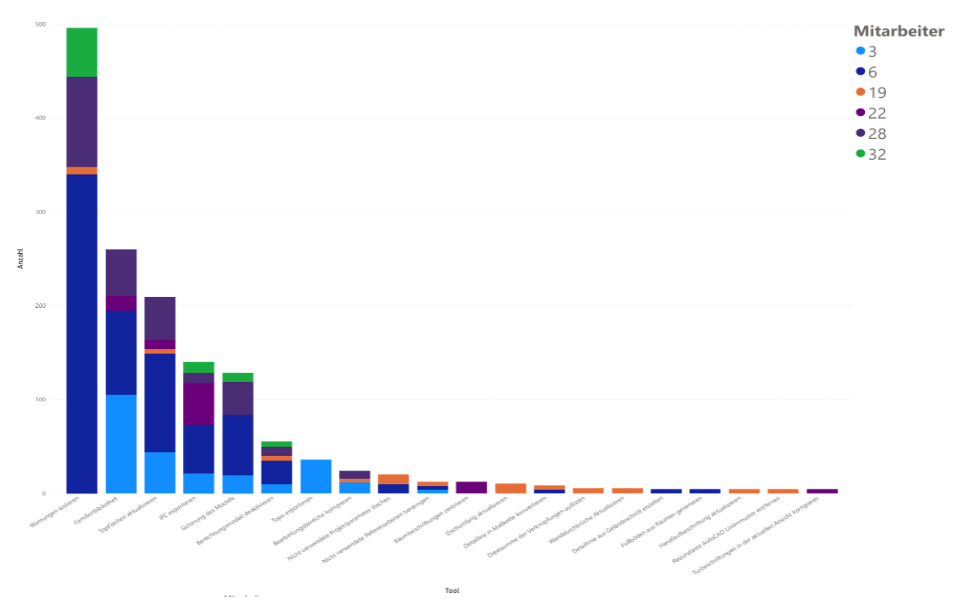
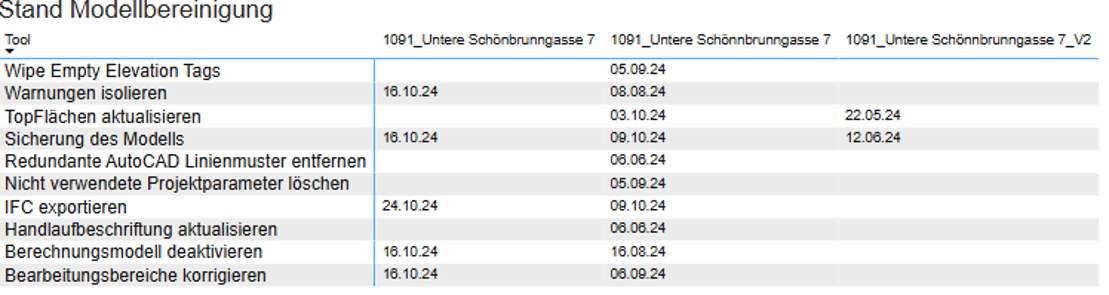
The use of pyRevit scripts can be logged.
This enables, for example, project-specific monitoring:
In addition, it is possible to monitor tool acceptance: