
The bimm-Tools are a comprehensive collection of tools available as a plug-in for Revit. They streamline practical workflows, make routine tasks more efficient, and thus enable easier and more productive use of Revit. The program provides extensive access to Revit databases and allows for specific query formulas within the software.
Type: BIM Authoring Tool
Disciplines: Architecture/BIM Management/Structural Engineering/Building Services Engineering
Manufacturer: b.i.m.m GmbH
Manufacturer's website: www.bimm.eu
Level Manager
With the b.i.m.m LevelManager, you can assign any number of levels with precisely defined functions to a specific floor. For more information on the tutorial, click here.
Browser Structure Tool
Using the Browser Structure Tool, you can automatically generate custom views for individual trades. For more information on the tutorial, click here.
Parameter Sync
The Parameter Sync Tool, which consists of the ParameterExporter and ParameterImporter, can be used to manipulate or modify parameters. For more information on the tutorial, click here.
MultiPush Tool
Using the MultiPush Tool, parameter values can be calculated and populated based on specific rules. In addition to the ability to freely create custom rules, ATP also includes a section for predefined, standardized rules intended for repeated use. Below is a brief explanation of the MultiPush Tool section in Revit:
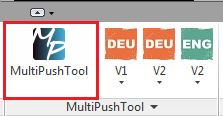
The >b.i.m.m Tools menu contains two sections:
- The standard MultiPush Tool button: Command for custom rules:
- the ATP-specific buttons with default settings (drop-down menus):
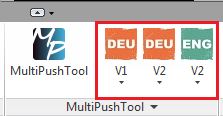
Explanation of the 3 drop-down menus:
The linguistic division into German and English, as well as the distinction between Content Versions V1 and V2 (family/template versions), is necessary because the MultiPush Tool rules are based on a formula-driven mapping of parameters that differ across the respective areas. These three buttons therefore have the following meanings:
- DEU V1: Multipush buttons for German content version V1 -> for projects with a start date on or before October 2, 2016
- DEU V2: Multipush buttons for German content version V2 -> for projects with a start date on or after October 3, 2016
- ENG V2: Multipush buttons for the English content version V2 -> for projects launched on or after August 31, 2017
Tooltip:
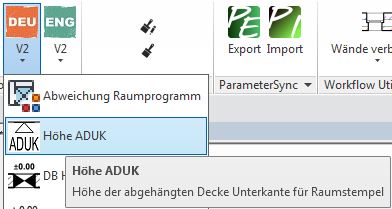
You can find the description for each button in this drop-down menu using the tooltip. To do this, simply hover the mouse pointer over a command until an additional text explanation appears.
Example of a tooltip:
Manufacturer's manuals
Various b.i.m.m. tools are available to streamline practical workflows, make routine tasks more efficient, and simplify the use of Revit:
Manufacturer's online help
The b.i.m.m ToolManager is the central management program for all b.i.m.m Tools.
You can find the online help here:
www.bimm.eu/b.i.m.m_ToolManager
YouTube
b.i.m.m YouTube channel:
At this time, the operators of BIMpedia do not offer any training courses for this tool.