
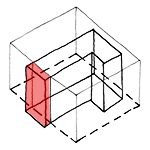
A building envelope refers to the three-dimensional outer shell of a building, which can be used to verify compliance with regulatory size and spacing requirements—such as property and building lot boundaries—through collision detection. In this regard, either Revit’s own commands or verification tools such as Solibri offer extremely comprehensive capabilities.
This article describes how to create a building object from a Revit object based on specified boundaries.
In addition, this tutorial also demonstrates how a Revit solid can be appropriately subdivided to match the vertical building structure.

Unfortunately, this content is available only to our Pro users.
If you'd like to read the full article, try the Pro account or become a Pro user.