
This Revit add-in applies parameter values from areas to all rooms located within those areas.
To load this content, you need to allow the YouTube service.
Areas often contain important information such as usage types, cost centers, organizational units, or responsibilities. However, this data often needs to be maintained separately in rooms, even though the rooms are already fully contained within the corresponding areas.
Manually transferring this information is time-consuming, prone to errors, and must be repeated every time the model is modified.
- No more manual transfer of area data to rooms
- Automatic, traceable assignment of rooms to areas
- Consistent parameter values across all affected rooms
- Reduction in maintenance effort and data entry errors
- Reproducible at any time—even after model changes
The user interface includes several input fields. Let's take a closer look at them.
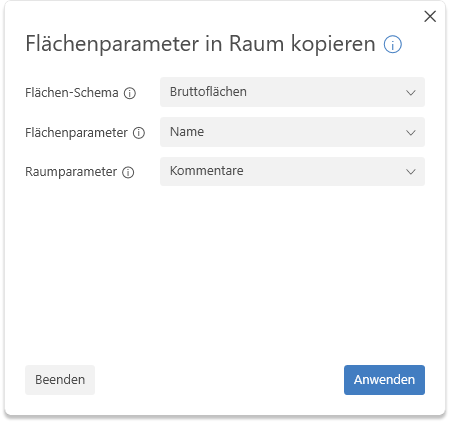
- Area Scheme:
The area scheme whose areas are to be included. Only those schemes for which corresponding areas exist in the model are listed. - Area Parameter:
The parameter whose value is to be copied to the room. Only those parameters for which a parameter value exists in at least one area are available for selection.
Note: The data type of the selected area parameter (e.g., Text) determines which room parameters are available for selection. - Room parameters:
Target parameters of rooms into which the value is to be copied.
Note: Only parameters with the corresponding data type are displayed.
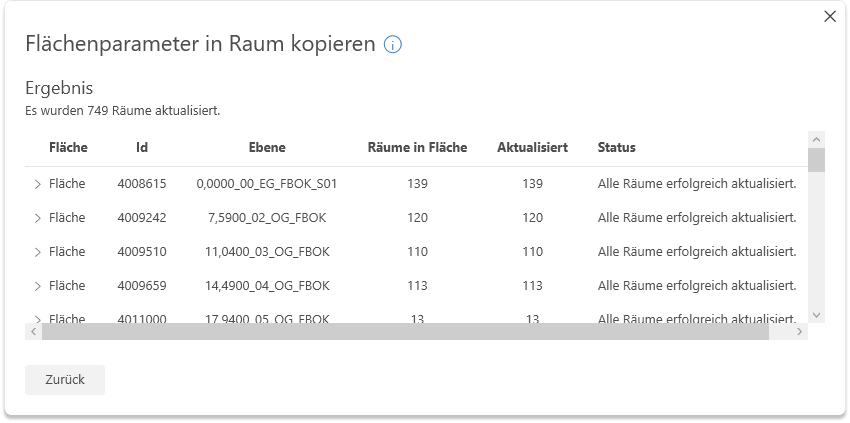
Clicking the "Apply" button starts the process. Rooms are now assigned to all areas of the selected schema. The assignment is made via insertion point and layer.
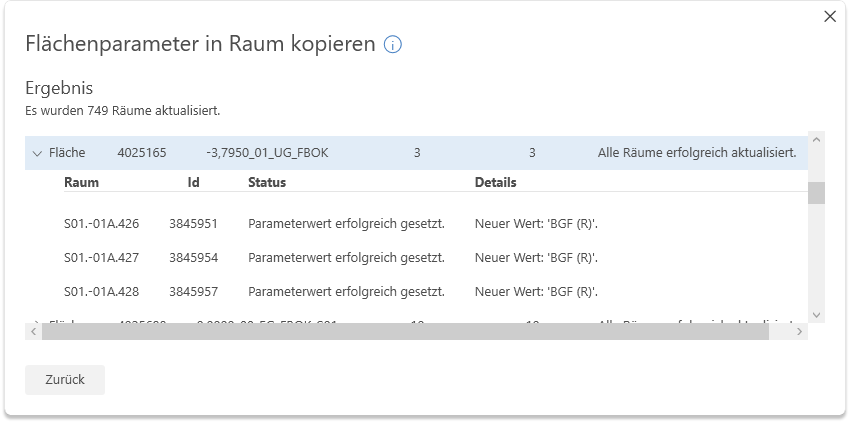
The parameter values are copied sequentially, and the result is displayed.
- 1.0.0.0
Initial release for Revit 2022–2026
If you have any problems or questions, or if you have any ideas or suggestions, please feel free to contact our customer service team. We look forward to hearing your suggestions for improvement!